Viewing Subcluster Layout in MC
If your Eon mode database has subclusters defined, the MC Database Manage page displays two tabs, the Database tab and the Subclusters tab.
The Subclusters tab lets you view, sort, and search for subclusters and view their layout and statistics. The page includes the following statistics in table form for the nodes in each subcluster, and for any unassigned nodes:
- Node name
- Private IP address
- Status (UP or DOWN)
- CPU Usage %
- Memory Usage %
- Disk Usage %
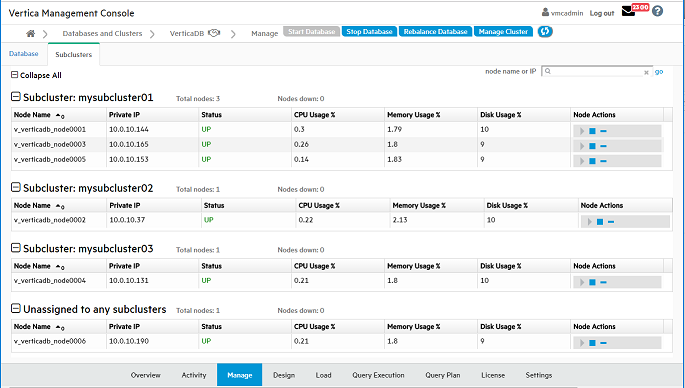
Searching for Nodes
To find a particular node, enter its node name or IP address in the "node name or IP" search field at the top right of the Subclusters tab. Searching for nodes is especially helpful if your cluster is very large. To find a specific node, enter its complete node name or IP address. Enter a partial node name or IP address to find all nodes whose name or IP address contains that string. For example, if you enter "240" in the search field, MC would find both of the following nodes:
Node name: MyNode24018
Node IP address: 1.160.10.240
Note that wildcards are not supported in the search field.
Stopping, Starting, or Removing Nodes
The right column provides icons for executing node actions. You can stop or start a node, or remove a node, in the subcluster. Removing a node also removes it from the database. Only the Start, Stop, and Remove actions are available on this page.
If you change the layout of your subcluster, for example by removing nodes, you must rebalance shards. See REBALANCE_SHARDS.
Sorting Nodes Within a Subcluster
You can sort the nodes within each subcluster by the values in any column, by clicking on the column heading.
Collapsing or Expanding a Subcluster, or the Entire Table
To collapse a subcluster section to one summary row, click the minus icon or the subcluster heading. To collapse the entire table to summary rows, click the minus icon or "Collapse All".
To expand a collapsed subcluster section, click the plus icon or the subcluster heading. To expand the entire table, click the plus icon or Expand All.
If you create a subcluster, but you do not assign any nodes to it, the subcluster will not display on the Database Manage page Subclusters tab.